Bring your HubSpot pipeline into Soundcheck.
Teams that sell in HubSpot run their shows in Soundcheck. A production company on Soundcheck keeps HubSpot as its CRM, and its deals arrive in Soundcheck as gigs. Export three lists from HubSpot, drop them into Soundcheck, and your companies become clients, open deals become leads and won deals become gigs.
What moves from HubSpot to Soundcheck
- Companies → Clients
- Contacts → Client contacts
- Open deals → Leads
- Won deals with a show date → Gigs
Quotes, line items, invoices, emails, calls, notes and workflows stay in HubSpot.
How to bring HubSpot data into Soundcheck
- In HubSpot, open CRM, then Companies, click Export and choose CSV or XLSX with all properties. Do the same for Contacts and Deals.
- In the Deals file, make sure every row has the client's email, the event date, the event type and the location. Close Date is the sale date, not the show date.
- In Soundcheck, open Settings, then Apps & data, then Import & export, and drop the Companies file on the page.
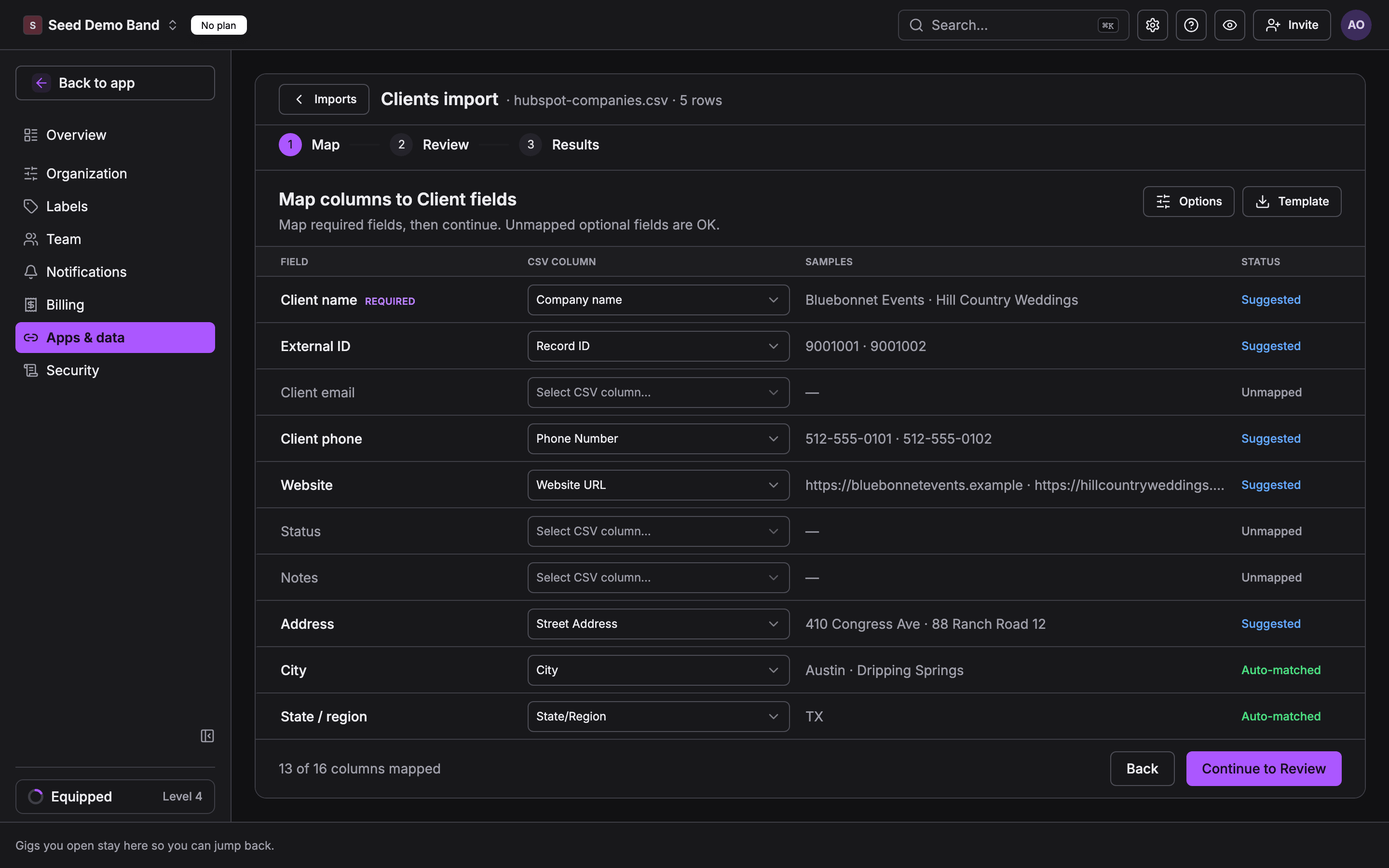
- Choose Clients as the target and confirm. Soundcheck suggests a field for each HubSpot column: Company name to Client name, Record ID to External ID.
- Check the preview and commit. Then import the Deals file as Leads, and a file of booked deals as Events.
- Import the same files once more. A clean move shows 0 new rows.
What to check first
- Merge duplicate companies in HubSpot first. Clients match by name.
- Leads need a client email, event date, event type, location and deal stage on every row.
- Keep Record ID in each export so a later import updates the same record.
Questions about moving from HubSpot
Can I use Soundcheck with HubSpot?
Yes. A production company on Soundcheck keeps HubSpot as its CRM and runs crew, schedules and show days in Soundcheck. To bring your data across, export Companies, Contacts and Deals from HubSpot as CSV or XLSX, then import them in Soundcheck under Settings, Apps & data, Import & export.
What moves from HubSpot into Soundcheck?
Companies become clients, contacts become client contacts, open deals become leads and won deals with a show date become gigs. Quotes, line items, invoices, emails, calls, notes and workflows do not import.
Does Soundcheck connect to my HubSpot account to migrate?
No. The move is file-based: you export from HubSpot and import the files. Separately, a HubSpot connection that lets your AI assistant read HubSpot contacts, companies and deals through Soundcheck is in early access.
Can I keep HubSpot for sales and use Soundcheck for shows?
Yes. That is how a production company on Soundcheck works today: it sells in HubSpot and runs crew, schedules and show days in Soundcheck. A sync that keeps HubSpot deal stages and Soundcheck gigs in step is not generally available yet.
Full HubSpot guide in the docs · All migration paths · From Flex Rental Solutions · From Back On Stage · From Planning Center · From LASSO · Start a free trial