Move from Back On Stage to Soundcheck.
A live entertainment booking agency moved from Back On Stage to Soundcheck: 16 upcoming gigs and 214 performer bookings, each with role and pay, came over in one spreadsheet. Back On Stage has no export of its own, so the move starts from a sheet: the ones you loaded it with, or a new one listing your gigs and who is on them.
What moves from Back On Stage to Soundcheck
- Members sheet → Crew
- Bookings sheet → Gigs, venues and clients
- Songs sheet → Songs
Setlists are rebuilt in Soundcheck after the songs are in. Booked roles, contracts and the expense export do not import.
How to move from Back On Stage to Soundcheck
- Find the Google Sheets you loaded Back On Stage with: Members, Bookings and Songs. If they are gone, list your upcoming gigs in a new sheet, with one row per person on each gig.
- In each sheet, choose File, then Download, then Comma-Separated Values.
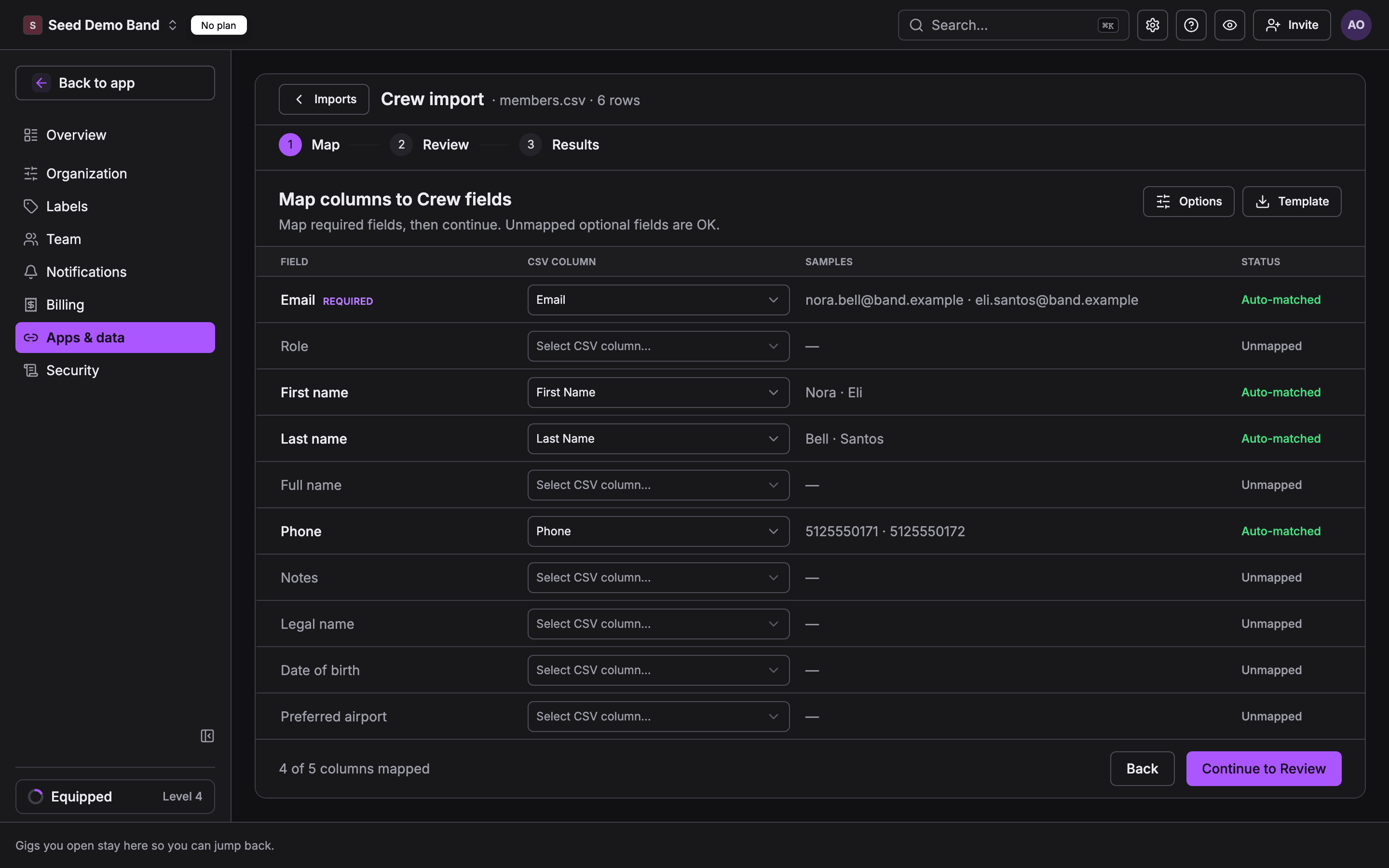
- In Soundcheck, open Settings, then Apps & data, then Import & export, and drop the Members file on the page.
- Check the mapping. Soundcheck matches First Name, Last Name, Email and Phone to its crew fields; confirm each one before you continue.
- Check the preview and commit. Then import Songs, then Bookings as Events.
- Rebuild your setlists from the imported songs, then import the same files once more and expect 0 new rows.
What to check first
- Every crew row needs an email address.
- No sheets left? A gig list plus one row per person per gig (role, email, pay) is enough to move.
- Setlist Builder has no CSV export, so setlists are rebuilt.
Questions about moving from Back On Stage
Can I move from Back On Stage to Soundcheck?
Yes. A booking agency moved 16 upcoming gigs and 214 performer bookings from Back On Stage into Soundcheck in one spreadsheet. Back On Stage has no export, so you download the sheets you loaded it with as CSV, or list your gigs and lineups in a new sheet, and import that.
Does Back On Stage have an export?
Not for members, bookings or setlists. Its only CSV export is expenses and payouts. The practical source is the Members, Bookings and Songs sheets used to load Back On Stage.
What if I no longer have my Back On Stage import sheets?
List your upcoming bookings in one spreadsheet with a row per person on each gig: the gig name, date and venue, then the person's role, email and pay. Give every row of a gig the same gig ID so the rows load as one gig with its lineup. That is how a booking agency moved, and Soundcheck's team can prepare the sheet with you.
Do my Back On Stage setlists come over?
No. Setlist Builder has no CSV export. Import your songs first, then rebuild the setlists in Soundcheck.
Full Back On Stage guide in the docs · All migration paths · From HubSpot · From Flex Rental Solutions · From Planning Center · From LASSO · Start a free trial